



Your sales team is likely wasting over half its time on leads that will never convert. Meanwhile, high-intent buyers are slipping away due to slow follow-up. This inefficiency burns marketing budget, demotivates your sales reps and creates a significant revenue gap. The disconnect between marketing-generated leads and sales-ready leads is costing you deals.
A strategic lead scoring system eliminates the guesswork. It automatically identifies and prioritizes your most valuable prospects so your sales team focuses exclusively on closing deals, not chasing ghosts.
In this guide, we’ll show you how to build a lead scoring framework that delivers measurable results. You’ll learn proven models, best practices and the tools that turn your lead data into revenue.
🔥 Hot tip: If you want faster ROI, use sales intelligence tools like UpLead to find in-market leads looking for a solution like yours today. Grab 5 free leads today.
What Is Lead Scoring?
Lead scoring is a methodology that ranks your leads based on their conversion potential. It uses data points about demographics, behavior and engagement to assign a numerical value to each lead.
Start with your leads. You can find them organically, purchase them or utilize sales prospecting. Once you have your leads, you determine their conversion potential with information about their behavior, their data (location, job title, company size), and their place in the buyer’s journey. You assign point values to qualify each attribute and score them accurately. Assigning points to leads involves evaluating each attribute—such as demographic fit or behavioral data like email opens and clicks—and determining how many points each should receive based on its impact on conversion likelihood. The better they perform in each area, the more points they get.
After each lead is properly scored, you can use lead scoring systems like BANT to qualify them and make sure you’re approaching the person with purchasing authority. Lead scoring works by assigning points to leads based on customer data and behavioral data, such as demographic, firmographic, and engagement metrics, to prioritize prospects most likely to convert.
The right lead scoring model streamlines your sales funnel. It lets your marketing and sales teams know which leads you can send directly to your sales team and which ones to place in nurturing campaigns. Lead scoring is important because it helps prioritize leads, improves ROI, and enables sales teams to focus on high-value prospects.
There’s no such thing as a universal lead scoring system for every company. A good lead scoring model is built with your ideal customer in mind. It should accurately score as many leads as possible in as little time as possible. Improving your conversion rate determines the efficiency of the lead scoring system.
By collaboratively developing a lead-scoring model, marketing and sales teams can arrive at a common definition of a hot lead. Effective lead scoring combines demographic and firmographic fit with behavioral interest, using automated systems to track actions and assign points.
What Is the Difference Between Lead Scoring and Lead Grading?
Lead scoring and lead grading answer two different questions about your prospects.
Lead scoring measures interest and engagement. It answers: “How interested is this lead in us?” This is implicit behavior. When a lead opens emails, downloads content or visits your pricing page, their score increases. Scoring tracks their level of engagement with your brand.
Lead grading measures fit against your Ideal Customer Profile (ICP). It answers: “How much do we want this lead?” This is explicit data. When a lead matches your target job title, company size, industry or revenue range, their grade improves. Grading evaluates whether they match your ideal buyer profile.
Think of it this way: scoring is how much they like you. Grading is how much you like them.
A perfect lead combines both. An A1 lead has high engagement (score) and perfect fit (grade). A D9 lead is highly engaged but completely wrong for your solution. A B2 lead fits your profile but shows little interest. Your sales team should prioritize A and B grade leads with scores above your threshold.
Most modern lead scoring systems combine both dimensions into a single framework. Some systems refer to this combined evaluation as a ‘fit score’, which represents both the lead’s suitability and engagement level. This ensures you focus on prospects who are both qualified and ready to buy.
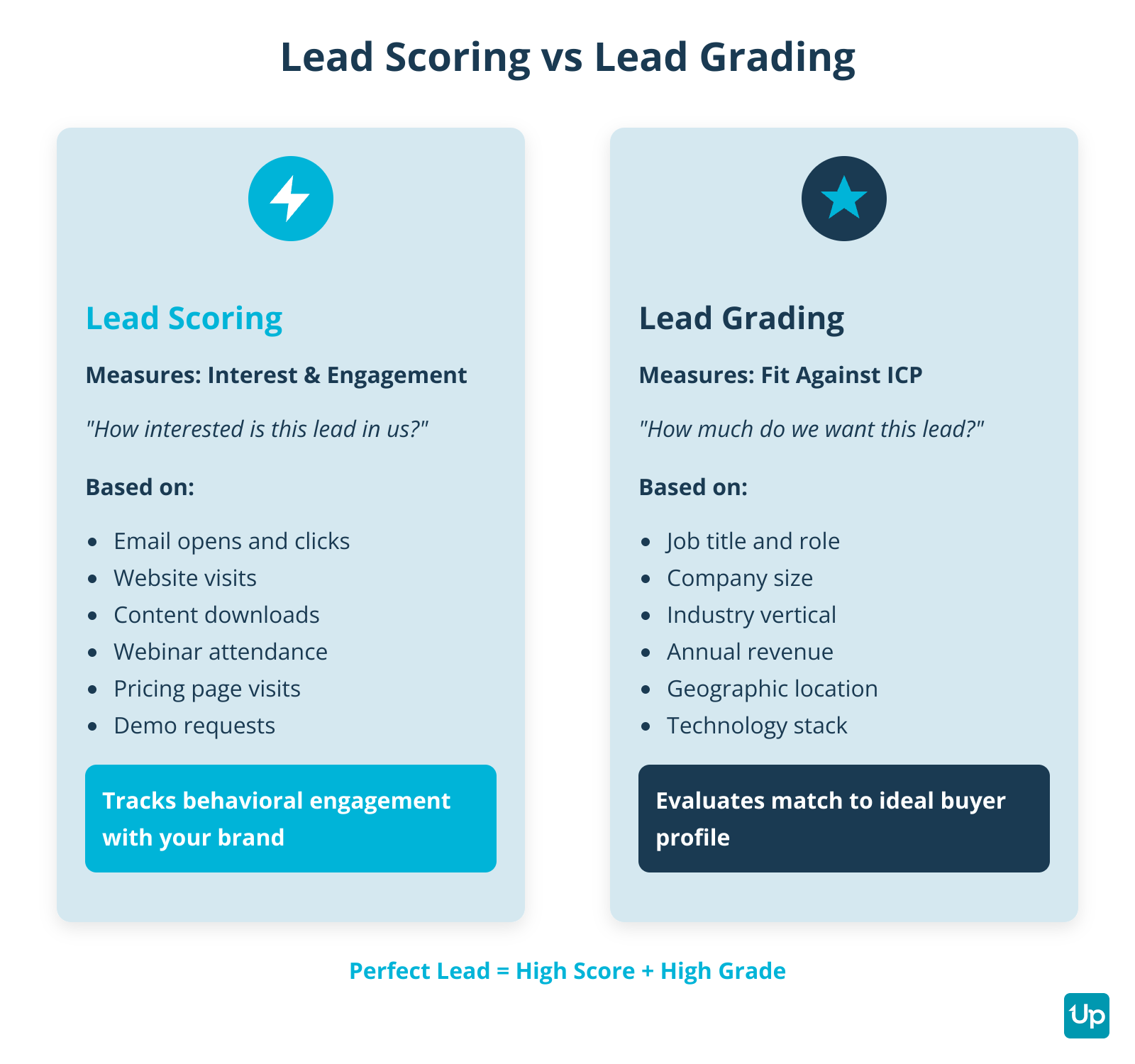
Lead Scoring vs Lead Grading Comparison
Why Is Lead Scoring Essential for Modern Sales and Marketing?
Lead scoring is essential for modern sales and marketing because it transforms how your revenue teams operate. It eliminates guesswork and creates a data-driven process for identifying your best opportunities. By prioritizing leads, lead scoring enables your team to focus on the best leads and relevant leads, ensuring that sales and marketing departments can efficiently identify potential customers and align their efforts. Organizations using lead scoring have seen a 77% lift in lead generation ROI by focusing resources on the most relevant leads.
How Does Lead Scoring Boost Sales Efficiency?
Lead scoring boosts sales efficiency by automatically identifying which leads are ready for a sales call and which need more nurturing. Your sales team wastes up to 70% of their time on unqualified leads. Research shows that 79% of marketing-generated leads never convert. Without a scoring system, reps spend hours chasing cold prospects while hot buyers go uncontacted.
Sales leaders consistently share that implementing lead scoring dramatically improves sales efficiency and helps teams prioritize the right prospects. Teams focusing on high-scoring leads experience up to 192% higher lead qualification rates compared to those without a scoring practice.
According to Salesforce, companies using lead scoring see a 30% increase in sales productivity. Your team focuses on prospects with real buying intent instead of wasting time on tire-kickers.
How Does Lead Scoring Increase Marketing ROI?
Lead scoring increases marketing ROI by letting you segment campaigns based on readiness. Marketing teams generate hundreds or thousands of leads. But not all leads are equal. Some need immediate follow-up. Others need months of nurturing. Without scoring, you treat them all the same.
Aligning your lead scoring model with your overall marketing strategy ensures resources are focused on the most promising leads. Companies using lead scoring can see a 70% improvement in ROI of lead generation efforts compared to those who don’t.
High-score leads get direct sales outreach. Medium-score leads enter targeted nurture sequences. Low-score leads stay in long-term awareness campaigns. This precision improves conversion rates by up to 38% and shortens sales cycles by 28%, according to a 2024 Forrester report.
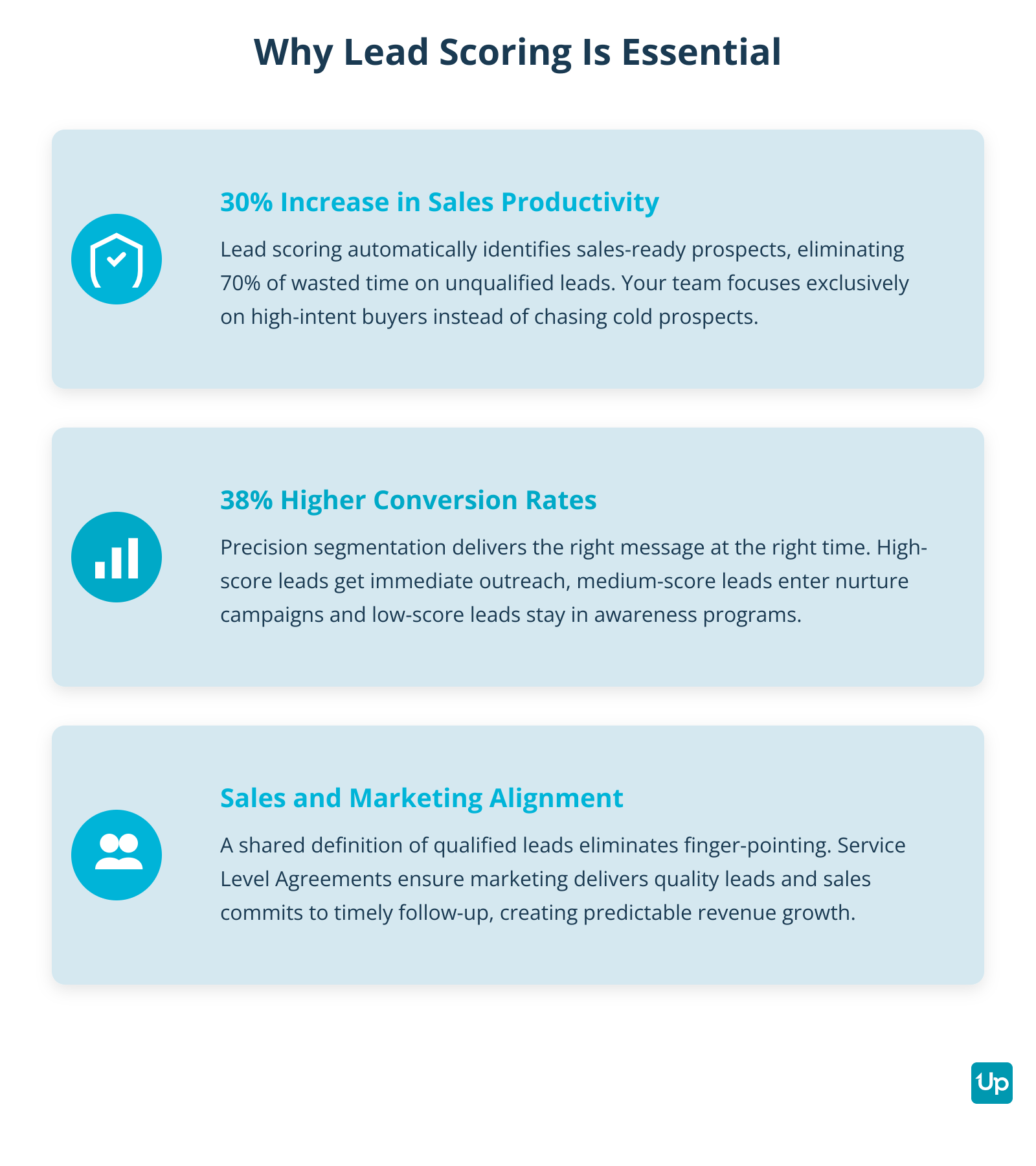
Key Benefits of Lead Scoring
How Does Lead Scoring Create Sales and Marketing Alignment?
Lead scoring creates sales and marketing alignment by establishing a shared definition of a qualified lead. The biggest source of revenue leakage is the handoff between marketing and sales. Marketing passes leads too early. Sales complains about lead quality. Everyone blames each other.
When both teams agree that a score of 75+ equals a Marketing Qualified Lead (MQL), the finger-pointing stops. A Service Level Agreement (SLA) codifies this: marketing delivers leads above the threshold, sales commits to follow-up within 24 hours. This alignment is the foundation of predictable revenue growth.
How Does Lead Scoring Accelerate Revenue?
Lead scoring accelerates revenue by giving you visibility into your pipeline. You know exactly how many high-score leads you have at any moment. This makes revenue forecasting far more accurate.
Lead scoring helps in converting leads more efficiently by focusing your efforts on those most likely to result in a closed deal. Predictive lead scoring uses AI to analyze historical wins and losses to identify complex correlations, helping you prioritize leads and improve conversion rates.
Companies using AI-powered lead scoring report conversion rate increases of 20-30%, according to Deloitte. Some case studies show companies tripling their qualified leads and cutting the sales cycle by 25%. When you know which leads will convert, you can predict revenue with confidence and allocate resources more effectively.
What Metrics and Data Fuel a Lead Scoring Model?
The metrics and data that fuel a lead scoring model include explicit data (fit), implicit data (interest), and intent data (external buying signals). A lead scoring model is only as good as the data you feed it. You need to collect the right attributes to accurately predict conversion potential.
Using existing customer data allows you to segment leads, create detailed buyer personas, and rank leads more effectively based on demographic, behavioral, and intent indicators. To implement a lead scoring model, you should create buyer personas based on customer data to better understand and target high-value prospects.
What Is Explicit Data in Lead Scoring?
Explicit data in lead scoring is information a lead provides directly. This includes demographics (personal attributes) and firmographics (company attributes).
For B2C companies, focus on personal attributes:
- Age
- Gender
- Location
- Income
For B2B solutions, firmographic data matters more:
- Company size
- Industry
- Annual revenue
- Job title
- Department
- Company age
You can gather this data via forms on your website, professional profiles on platforms like LinkedIn or direct conversations with prospects. Additionally, third-party data can be used to enrich explicit data, providing a more comprehensive view of leads and improving lead scoring accuracy.
For example, if you sell office supplies to businesses, a lead in the purchasing department or upper management gets +50 points. An accountant or HR professional gets +15 points. A self-employed person gets -25 points because they have less need for bulk office supplies.
What Is Implicit Data in Lead Scoring?
Implicit data in lead scoring reveals buying intent through behavior. A lead’s actions tell you how interested they are in your solution. Behavioral data includes all the ways a lead interacts with your brand, such as email opens, clicks, and social media engagement.
Track these behavioral signals:
- Email opens and clicks
- Website visits and page views
- Content downloads (eBooks, whitepapers)
- Webinar attendance
- Form submissions
- Demo requests
- Pricing page visits
- Social media engagement
Assign points based on engagement level. Common actions get fewer points. High-intent actions get more.
Example scoring:
- +2 points per page visited
- +3 points per email opened
- +5 points per email link clicked
- +15 points per eBook downloaded
- +15 points per form filled out
- +20 points per webinar attended
- +30 points for visiting the pricing page
- +50 points for requesting a demo
You should also track recency. A lead who opened two emails last week is more valuable than a lead who downloaded an eBook six months ago but hasn’t engaged since. This is where score decay becomes critical (we’ll cover this in the best practices section).
You can determine the most important user behavior by examining leads that have already become customers. This data tells you which forms are the most valuable (such as a demo request form) and which pages they visit before buying (such as the pricing page). This insight helps you improve your sales strategy and score leads accordingly.
What Is Intent Data in Lead Scoring?
Intent data in lead scoring shows what prospects are researching outside your website. This includes topics they search for, content they consume on third-party sites and technologies they evaluate.
For B2B companies, technographic data is especially valuable. You can tell a lot about a company based on its technology stack. If you sell a SaaS solution that integrates with Salesforce, a lead using Salesforce is far more valuable than a lead using a competing CRM with no integration.
Example technographic scoring:
- +30 points for using a CRM that natively integrates with your solution
- +10 points for using a CRM that can integrate via third-party tools
- 0 points for not using a specific CRM
- -10 points for using a direct competitor’s CRM
- -50 points for having no CRM at all
A purchase intent model analyzes web activity and behavior data to predict a lead’s likelihood of converting by identifying engagement signals that indicate readiness to buy. Analyzing the behaviors of your existing customers can also help refine your intent data scoring, as it reveals patterns and preferences that are strong indicators of future purchase intent.
Other valuable technographics include:
- Content management system
- Email service provider
- Marketing automation platform
- Analytics tools
Intent data and technographics help you identify leads who are actively in-market and have the infrastructure to use your solution.
What Are the Main Lead Scoring Models?
The main lead scoring models are manual/rule-based scoring, account-based scoring and negative scoring. Different lead scoring models suit different business needs. You can choose a manual approach for simplicity, an account-based model for enterprise sales or a negative scoring model to filter out bad fits.
When selecting a model, it’s important to follow lead scoring best practices to ensure the right fit for your business. The most accurate 2025 strategies combine multiple data types—such as demographic, behavioral, and firmographic data—rather than relying on just one.
What Is Manual Lead Scoring?
Manual lead scoring is the simplest approach where you define attributes that matter to your business and assign point values based on importance. Assigning points to each attribute helps prioritize leads and improve sales efficiency. It’s important to carefully determine how many points to assign to each attribute, ensuring the point values reflect the impact on close rates and align with your team’s goals. Common lead scoring criteria include BANT: budget, authority, need, and timeline.
Start by calculating your lead-to-customer conversion rate. This is the percentage of leads that convert. According to 2024 data, the average B2B lead-to-customer conversion rate falls between 2% and 5%. Professional services average 4.6% while B2B technology averages 2.3%. For a broader perspective, the average website conversion rate (turning a visitor into a lead) is about 3.3%. This baseline helps you gauge future success.
Next, define the attributes of your ideal leads using the data categories above. Assign point values: the more important the attribute, the higher the value. Then go through your leads and rate them according to your chosen attributes.
Manual scoring works well when you have a small volume of leads or when you’re just starting out. The downside is that it’s time-consuming and relies on assumptions rather than data-driven patterns.
What Is Account-Based Scoring?
Account-based scoring focuses on entire companies rather than individual leads. This model is ideal for enterprise B2B sales where multiple stakeholders influence the buying decision.
In account-based scoring, you score the account (company) based on firmographic fit, then score individual contacts within that account based on their role and engagement. A VP of Sales at a high-value account gets a higher combined score than a junior employee at the same company.
This approach aligns with account-based marketing (ABM) strategies. It helps sales teams coordinate outreach across multiple decision-makers and track account-level engagement.
What Is Negative Scoring?
Negative scoring removes points when a lead shows disqualifying characteristics. This helps filter out bad-fit prospects early.
Examples of negative scoring:
- -50 points for using a competitor’s email domain
- -30 points for company size too small (below your minimum)
- -25 points for industry you don’t serve
- -20 points for unsubscribing from emails
- -15 points for job title with no buying authority
- -10 points per month of inactivity
Negative scoring prevents your sales team from wasting time on leads who will never convert. It’s especially useful when you generate high volumes of leads from broad marketing campaigns.
Most effective scoring models combine positive and negative scoring. This creates a more accurate picture of lead quality than positive scoring alone.
How Does AI Revolutionize Lead Scoring?
AI revolutionizes lead scoring by using machine learning to analyze historical data and identify complex patterns that humans would miss. This approach is far more accurate than manual, rule-based scoring.
Predictive lead scoring models use AI and machine learning to analyze large volumes of data and adjust scores dynamically as new data becomes available. Modern platforms leverage machine learning to identify hidden conversion patterns that traditional methods might overlook. Effective lead scoring in 2025 requires dynamic, AI-enhanced systems for behavioral tracking and automated maintenance.
Predictive models analyze thousands of data points from your CRM. They compare the attributes and behaviors of leads who converted versus leads who didn’t. The AI identifies which combinations of factors predict success, then applies those patterns to score new leads automatically.
The results are compelling. According to a 2024 Forrester report, businesses using AI for lead scoring see an average 38% increase in lead-to-opportunity conversion rates and a 28% shorter sales cycle. A Deloitte report from the same year found it can boost overall conversion rates by 20-30%. Case studies show some companies tripling their qualified leads and cutting the sales cycle by 25%. Gartner research suggests companies using AI-powered lead scoring experience a 30% increase in sales productivity.
Predictive scoring solves several problems with manual models:
- Eliminates bias: Manual models reflect your assumptions. AI finds what predicts conversion, even if it surprises you.
- Handles complexity: AI can analyze hundreds of variables and their interactions. Manual models are limited to a handful of attributes.
- Adapts automatically: As your business evolves, AI updates the model based on new data. Manual models require constant manual adjustment.
- Saves time: Once set up, predictive scoring runs automatically. No more spreadsheets or manual calculations.
AI-powered lead scoring is no longer just for enterprises. Many CRM platforms now offer predictive scoring as a built-in feature. Tools like HubSpot, Salesforce and specialized platforms like 6sense and Infer make this technology accessible to mid-market companies.
The key requirement is data volume. Predictive models need hundreds (ideally thousands) of historical leads to identify reliable patterns. If you’re just starting out, begin with manual scoring and transition to predictive once you have enough data.
How Do You Build a Lead Scoring Framework?
You build a lead scoring framework by establishing your ICP, identifying key attributes, defining thresholds, integrating with your CRM and monitoring performance. Building an effective lead scoring framework requires a structured approach. To implement lead scoring, assign points to different data points, determine threshold levels for sales qualification, and align sales and marketing strategies based on lead scores. Following a structured lead scoring process is essential for optimizing sales conversion.
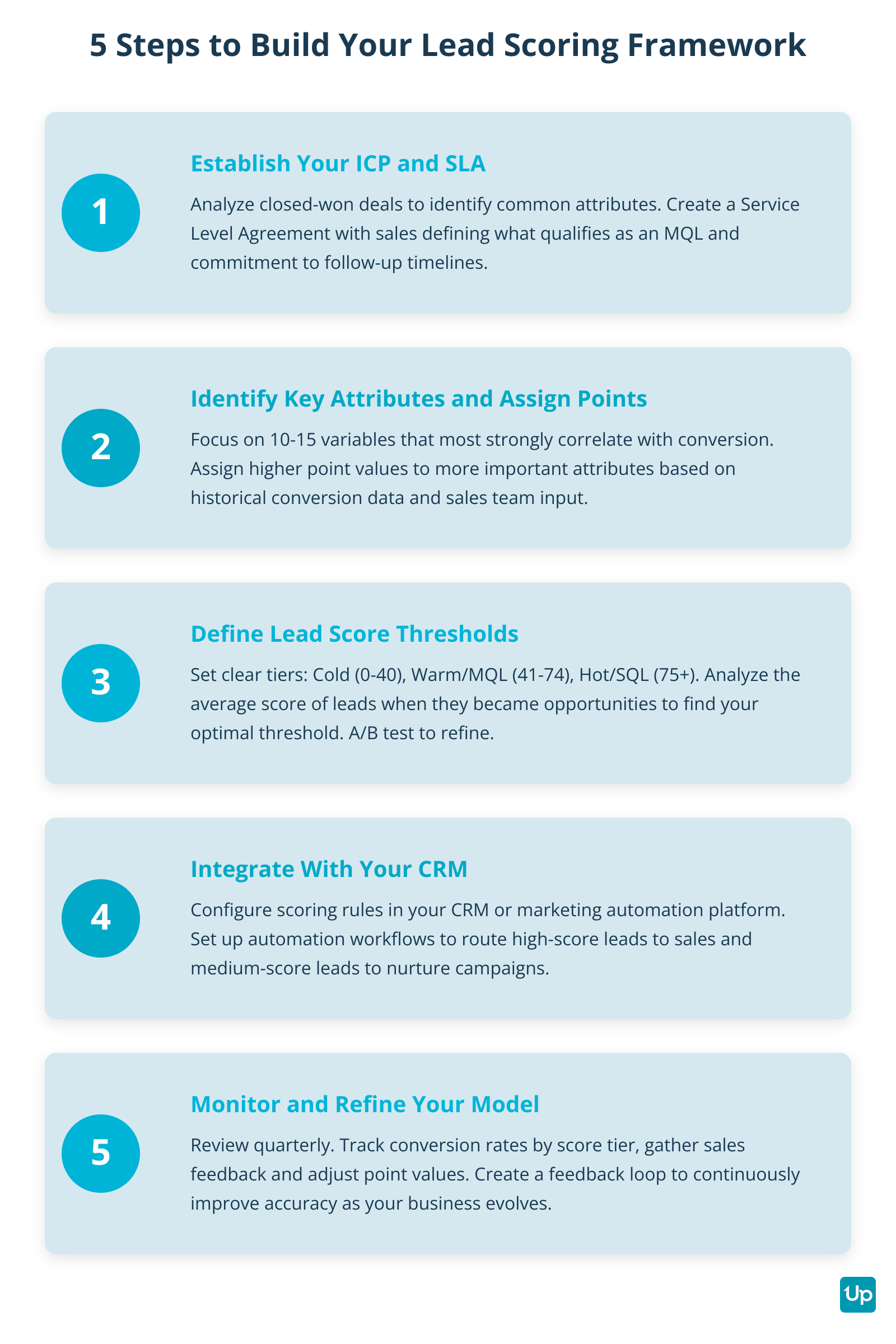
A lead scoring model is a living system that requires regular maintenance, including quarterly reviews and data hygiene.
Five Steps to Build Lead Scoring Framework
How Do You Establish Your ICP and SLA?
You establish your ICP and SLA by analyzing your CRM data to identify common attributes of closed-won deals and creating a Service Level Agreement with your sales team. Your Ideal Customer Profile (ICP) defines who you want to target. This is the foundation of your scoring model.
Look at your closed-won deals from the past 12-24 months. Identify key attributes and behaviors that consistently lead to a closed deal, such as specific industries, company sizes, job titles, technologies used, and content engagement before buying. Tracking these successful conversions helps refine your lead-scoring model, providing better sales insights and decision-making.
Then analyze your closed-lost deals. What attributes do they share? This tells you what to penalize with negative scoring. Common disqualifying factors include competitors’ email domains, irrelevant job titles, or non-target geographic locations.
Next, create a Service Level Agreement (SLA) with your sales team. This codifies the definition of a Marketing Qualified Lead (MQL) and the sales team’s commitment to follow-up.
A clear lead handoff process between marketing and sales is essential for sales enablement and revenue growth. Ensure procedures, data integration, and ongoing optimization are in place to make this transition efficient and effective.
Example SLA:
- Marketing will deliver leads with a score of 75 or higher
- Sales will contact these leads within 24 hours
- Sales will provide feedback on lead quality within 7 days
- Both teams will review the scoring model quarterly
This SLA eliminates the blame game and creates shared accountability for revenue.
How Do You Identify Key Attributes and Assign Point Values?
You identify key attributes and assign point values by focusing on variables that most strongly correlate with conversion and assigning higher values to more important attributes. Once you’ve defined your ICP, identify which attributes to score. Determining the point threshold at which a lead is considered qualified is essential, as it helps guide when a lead should be passed to sales.
Talk to your sales team. Ask questions like:
- What needs does the typical customer have?
- What characteristics do they share?
- Which parts of the sales and marketing materials are they most interested in?
- What red flags indicate a bad fit?
Then assign point values. Here’s an example scoring table for a B2B SaaS company:
| Attribute | Criteria | Points |
|---|---|---|
| Company Size | 50-200 employees (ideal) | +25 |
| 201-500 employees | +15 | |
| Under 50 or over 500 | +5 | |
| Job Title | VP or C-level | +30 |
| Director or Manager | +20 | |
| Individual contributor | +5 | |
| No buying authority | -15 | |
| Industry | Target industry | +20 |
| Adjacent industry | +10 | |
| Non-target industry | -20 | |
| Technology | Uses integrating CRM | +30 |
| Uses compatible CRM | +10 | |
| Uses competitor CRM | -10 | |
| No CRM | -50 | |
| Email Engagement | Opened email | +3 |
| Clicked link | +5 | |
| Website Activity | Page visit | +2 |
| Pricing page visit | +30 | |
| Content | Downloaded eBook | +15 |
| Attended webinar | +20 | |
| High Intent | Requested demo | +50 |
| Started free trial | +75 | |
| Disqualifiers | Unsubscribed | -20 |
| Competitor domain | -50 |
Note: Use negative points to deduct from a lead’s score for undesirable behaviors, such as disengagement, lack of information, or spam-like activity, to more accurately assess lead quality.
This table gives you a starting point. Adjust the values based on your own conversion data. Setting a clear lead score threshold, or point threshold, in collaboration with sales and marketing ensures you know exactly when a lead is ready for sales outreach and helps prevent misclassification of leads.
How Do You Define Lead Scoring Thresholds?
You define lead scoring thresholds by analyzing the scores of historically converted customers and categorizing leads into cold, warm, and hot tiers. Thresholds are the specific scores—known as the point threshold—that trigger an action. The point threshold is the score at which a lead is considered qualified for sales outreach. They categorize leads into tiers so you know what to do with each one.
Define three tiers:
- Cold (0-40 points): Low engagement and poor fit. Keep in low-touch nurture campaigns or disqualify entirely.
- Warm/MQL (41-74 points): Medium engagement and decent fit. These are often called marketing qualified leads (MQLs), identified by their fit and engagement levels, and are ready for marketing nurture campaigns with targeted content.
- Hot/SQL (75+ points): High engagement and strong fit. A hot lead is often referred to as a sales qualified lead (SQL), meaning it has been evaluated through lead scoring and is ready for sales engagement. Pass immediately to sales for direct outreach.
Look at the average score of leads at the moment they became opportunities. That number becomes your SQL threshold.
A/B testing thresholds is also a key best practice. Try passing leads at 70+ points to sales for one month, then 80+ points the next month. Measure conversion rates and sales feedback to find the optimal threshold.
Your thresholds will evolve as your business grows and your scoring model improves. Review them quarterly and adjust based on performance data.
How Do You Integrate Lead Scoring With Your CRM?
You integrate lead scoring with your CRM by configuring scoring rules in your platform and setting up automation workflows. Your lead scoring system must live in your CRM and marketing automation platform. This enables automation and ensures scores update in real time. Integrating lead scoring with your CRM helps align the sales process with lead readiness, ensuring that sales teams engage leads at the optimal stage.
Most modern CRMs (Salesforce, HubSpot, Zoho) and marketing automation platforms (Marketo, Pardot, ActiveCampaign) have built-in lead scoring features. Configure your scoring rules in the platform based on the attributes and point values you defined.
Set up automation workflows:
- When a lead reaches 75 points, automatically create a task for sales to follow up
- When a lead reaches 50 points, add them to a targeted nurture campaign
- When a lead score drops below 20 due to inactivity, pause outreach
A clear lead handoff process ensures that qualified leads are efficiently transferred from marketing to sales, improving sales enablement and supporting revenue growth.
Integration also enables better reporting. You can track metrics like average score by source, conversion rate by score tier and score velocity (how quickly leads move from cold to hot).
How Do You Monitor and Refine Your Lead Scoring Model?
You monitor and refine your lead scoring model by scheduling quarterly audits and creating a feedback loop with your sales team. Lead scoring is not a set-it-and-forget-it system. Your market changes. Your product evolves. Your ideal customer profile shifts. Your scoring model must adapt.
Review these metrics:
- What percentage of high-score leads convert?
- Are sales reps following up on high-score leads?
- Are any low-score leads converting? (This signals your model is missing something.)
- What feedback is sales providing on lead quality?
Use existing customer data to refine your scoring model by identifying patterns and characteristics that lead to successful conversions. Analyzing existing customer behaviors helps improve lead scoring accuracy, ensuring your model targets high-value prospects more effectively.
Use this data to adjust point values, add new attributes or change thresholds. Ask them to flag leads that scored high but were poor fits, and leads that scored low but converted anyway.
A well-maintained lead scoring model improves over time. The more data you collect, the more accurate it becomes.
How Do You Build a Simple AI-Powered Scoring System?
You build a simple AI-powered scoring system by using your CRM’s built-in predictive scoring, using a specialized predictive scoring tool or building a basic logistic regression model. Predictive lead scoring models use AI and machine learning to analyze your historical data, identify purchase patterns, and generate a fit score for each lead based on their suitability and engagement level. You don’t need a data science team to implement AI-powered lead scoring. Many no-code and low-code tools make this accessible to any business with sufficient historical data.
Here’s a practical approach using tools you may already have:
Option 1: Use Your CRM’s Built-In Predictive Scoring
HubSpot, Salesforce and other enterprise CRMs offer predictive lead scoring as a native feature. HubSpot’s predictive scoring analyzes your historical data and automatically scores new leads based on their likelihood to convert, generating a fit score that helps prioritize outreach.
To set this up in HubSpot:
- Navigate to Settings → Properties → Contact Properties
- Create a new property called “Predictive Lead Score”
- Enable predictive scoring (requires at least 1,000 contacts and 100 closed deals)
- HubSpot’s AI analyzes your data and assigns scores automatically
- Set up workflows to route high-score leads to sales
This approach requires no coding and leverages the AI built into your existing platform.
Option 2: Use a Specialized Predictive Scoring Tool
If your CRM doesn’t offer predictive scoring, use a specialized tool that integrates with it. Platforms like Infer, 6sense and Madkudu connect to your CRM, analyze your data and push predictive scores back into your system. These predictive lead scoring models use AI to generate a fit score for each contact, improving targeting strategies.
These tools offer free trials. You can test predictive scoring without a major investment.
Option 3: Build a Simple Logistic Regression Model in Google Sheets
For a DIY approach, you can build a basic predictive model using Google Sheets and historical data. This requires some comfort with spreadsheets but no programming.
- Export your historical lead data (minimum 500 leads)
- Include columns for key attributes (company size, job title, industry, email opens, page views, etc.)
- Add a column for “Converted” (1 for yes, 0 for no)
- Use a logistic regression formula to calculate the probability each attribute predicts conversion
- Assign point values based on these probabilities to create a fit score
- Apply the formula to score new leads
This method uses data mining techniques to identify which attributes predict conversion. It’s more accurate than manual scoring because it’s based on your results, not assumptions.
For a ready-made template, check out the Machine Learning for Predictive Lead Scoring project on GitHub. This open-source tool provides a formula you can customize with your own data.
The key to success with any AI approach is data quality. If your CRM data is incomplete or inaccurate, the model will produce poor results. This is where data enrichment becomes critical.
What Are the Best Practices for Lead Scoring?
The best practices for lead scoring include using both positive and negative scoring, implementing score decay, creating persona-specific models, using progressive profiling, maintaining data hygiene, creating a feedback loop with sales and regularly auditing your model. Lead scoring best practices emphasize simplicity, regular review, and integrating predictive modeling to refine lead qualification and prioritization. Lead scoring is important because it helps sales and marketing teams prioritize leads, improve sales efficiency, and quickly identify high-value prospects, especially in competitive markets. Follow these best practices to maximize the effectiveness of your lead scoring system.
Why Should You Use Both Positive and Negative Scoring?
You should use both positive and negative scoring because it filters out disqualifying factors and ensures your sales team focuses on real opportunities. Don’t just add points for good attributes. Subtract points for disqualifying factors. A lead with a high engagement score but a terrible fit will waste your sales team’s time.
Negative scoring helps filter out students, competitors, job seekers and other non-buyers. Negative points are deducted from a lead’s score for undesirable behaviors or attributes, such as disengagement, lack of information, or spam-like activity, to more accurately assess their likelihood to convert.
Why Should You Implement Score Decay?
You should implement score decay because it ensures your sales team always works with a fresh, relevant list of engaged leads. Score decay is the automatic reduction of a lead’s score over time due to inactivity. A high score from six months ago is irrelevant if the lead has gone cold.
Implement decay by reducing scores by a set percentage each month of inactivity. For example, reduce the score by 10% each month a lead doesn’t engage.
Think of score decay like a half-life. A lead’s interest has a limited shelf life. After a certain period, their score should reflect their current level of engagement, not past behavior.
Why Should You Create Persona-Specific Scoring Models?
You should create persona-specific scoring models because different buyer personas have different needs and show different buying signals. If you sell to multiple buyer personas, create separate scoring models for each. A CFO and a CMO have different needs, consume different content and show different buying signals.
Persona-specific models improve accuracy. A webinar about financial compliance is relevant for a CFO but irrelevant for a CMO. Your scoring should reflect this.
Most CRMs allow you to create multiple scoring properties. Set up one for each persona and route leads accordingly.
Why Should You Use Progressive Profiling?
You should use progressive profiling because it improves form conversion rates while building a complete lead profile over time. Don’t ask for every piece of information upfront. Use progressive profiling to gather data gradually across multiple interactions.
On the first form, ask for name and email. On the second, ask for company and job title. On the third, ask for company size and pain points. This approach reduces friction in the buyer’s journey.
As you gather more data, your lead scores become more accurate.
Why Is Data Hygiene Critical for Lead Scoring?
Data hygiene is critical for lead scoring because your scoring model is only as good as your data. If your CRM is full of outdated information, duplicate records and incomplete profiles, your scores will be meaningless.
Implement regular data hygiene practices:
- Remove duplicate records
- Update job titles and company information
- Verify email addresses
- Enrich incomplete records with missing data
Tools like UpLead solve this problem through data enrichment. UpLead gathers publicly available data from millions of leads to help you build richer lead profiles. You can enrich the leads you already have or find new ones with complete, accurate data from the start.
Clean data means accurate scores. Accurate scores mean better sales outcomes.
Why Should You Create a Feedback Loop With Sales?
You should create a feedback loop with sales because they are the ultimate judge of lead quality and their insights help refine your model. Your sales team talks to prospects every day. They know which leads convert and which waste time.
Create a formal feedback process. Ask sales to flag leads that scored high but were poor fits, and leads that scored low but converted anyway. Use this feedback to refine your model.
Schedule monthly meetings between sales and marketing to review lead quality. This communication ensures alignment and continuous improvement.
Why Should You Regularly Audit Your Model?
You should regularly audit your model because it helps you identify what’s working and adjust your scoring to maintain accuracy. Every quarter, analyze your closed-won deals. What were their scores at the moment they became opportunities? What attributes did they share? What content did they engage with?
Compare this to your current scoring model. Are you rewarding the right behaviors? Are you penalizing the right disqualifiers?
Use this analysis to adjust point values and thresholds. A well-maintained model becomes more accurate over time.
What Common Lead Scoring Mistakes Should You Avoid?
The common lead scoring mistakes you should avoid are overcomplicating the model, setting it and forgetting it, ignoring data quality, not testing thresholds and scoring without sales buy-in. Even experienced teams make these mistakes. Avoid them to keep your scoring system effective.
Mistake 1: Overcomplicating the Model
Don’t score 50 different attributes. Focus on the 10-15 variables that most strongly predict conversion. A simple, accurate model beats a complex, confusing one.
Mistake 2: Setting It and Forgetting It
Your scoring model needs regular maintenance. Markets change. Products evolve. Buyer behavior shifts. Review and update your model quarterly.
Mistake 3: Ignoring Data Quality
Garbage in, garbage out. If your CRM data is incomplete or inaccurate, your scores will be meaningless. Invest in data hygiene and enrichment.
Mistake 4: Not Testing Thresholds
Don’t guess at your SQL threshold. Test different thresholds and measure conversion rates. Find the optimal balance between volume and quality.
Mistake 5: Scoring Without Sales Buy-In
If sales doesn’t trust the scoring system, they’ll ignore it. Involve sales in building the model and formalize expectations with an SLA.
What Are the Top Lead Scoring Software and Data Enrichment Tools?
The top lead scoring software and data enrichment tools include HubSpot, Salesforce, Zoho CRM, 6sense, Infer, Marketo Engage, Pardot, ActiveCampaign and UpLead. The right tools make lead scoring easier and more accurate. Here are the leading options by category.
What Are the Best All-in-One CRM Platforms for Lead Scoring?
The best all-in-one CRM platforms for lead scoring are HubSpot, Salesforce and Zoho CRM. These platforms combine CRM, marketing automation and lead scoring in one system.
HubSpot offers both traditional and predictive lead scoring. You can create custom scoring rules or let AI analyze your data and score leads automatically. HubSpot allows up to 25 scoring sheets so you can score different audiences with different criteria. It integrates seamlessly with the rest of the HubSpot ecosystem.
Salesforce is the leader in CRMs. Its lead scoring feature tracks leads to see where they come from and how they behave. You can set up automatic lead scoring systems to ensure all leads are properly developed and assigned to the right team. Salesforce’s Einstein AI adds predictive capabilities.
Zoho CRM lets you score leads based on demographics, behavior, survey responses and email insights. Through positive and negative scoring, Zoho helps you eliminate cold leads and transfer the most qualified leads to your sales team.
What Are the Best Enterprise Predictive Engines for Lead Scoring?
The best enterprise predictive engines for lead scoring are 6sense and Infer. These specialized tools focus on AI-powered predictive scoring.
6sense uses intent data and AI to identify accounts showing buying signals. It’s designed for account-based marketing and scores entire accounts rather than individual leads.
Infer has powerful predictive lead scoring software. It uses thousands of data points, including the ones in your CRM and in their extensive database. It analyzes this data to score leads automatically. You can also use it to identify prospects and generate qualified leads.
What Are the Best Marketing Automation Platforms for Lead Scoring?
The best marketing automation platforms for lead scoring are Marketo Engage, Pardot and ActiveCampaign. These tools specialize in marketing automation with strong scoring capabilities.
Marketo Engage focuses on B2B lead management. Its automated lead scoring tool is shaped by the marketer and based on the lead’s demographics, behaviors and desired ranks. With these tools, you can build workflows and smart lists based on your leads. Marketo also provides webinars and other resources to help you use its lead scoring tool more effectively.
Pardot (now called Marketing Cloud Account Engagement) combines lead scoring with lead grading. This dual approach helps you score leads based on engagement and grade them based on fit. When used together, these features automatically send qualified leads to your sales team.
ActiveCampaign lets you score leads based on their data and behavior. Once you’ve qualified a lead, you can automate your offer process to pitch your solution right away. Since you can set up scores for multiple products, you can offer the right product to the right lead.
Why Is UpLead Essential for Data Enrichment?
UpLead is essential for data enrichment because it provides complete, accurate data that makes any scoring tool more effective. Your scoring model is only as good as your data. This is where UpLead provides a critical advantage.
UpLead’s data enrichment gathers publicly available data from millions of leads to help you build richer lead profiles. You can enrich the leads you already have or find new ones with complete, accurate data from the start.
UpLead provides:
- Real-time email verification (95% accuracy guarantee)
- Direct dial phone numbers
- Technographic data (27,000+ tracked technologies)
- Firmographic data (company size, revenue, industry)
- Intent data (buying signals)
This complete data lets you score leads accurately, whether you’re using manual scoring or feeding data into machine learning software. UpLead acts as the foundational data layer that makes any scoring tool more accurate.
Think of it this way: HubSpot and Salesforce are excellent at scoring the data you have. UpLead ensures you have the right data to score in the first place.

Frequently Asked Questions About Lead Scoring
What Is a Good Lead Score?
A good lead score depends on your specific business and scoring model. There’s no universal “good” score.
In most systems, scores range from 0 to 100 (or higher if you use aggressive point values). A typical threshold structure looks like this:
- 0-40: Cold lead
- 41-74: Warm lead (MQL)
- 75+: Hot lead (SQL)
The key is to analyze your historical data. Look at the average score of leads at the moment they became opportunities. That number is your baseline for a “good” score in your system.
How Do You Calculate a Lead Score Manually?
To calculate a lead score manually, follow these steps:
- Identify the attributes that predict conversion (job title, company size, email engagement, etc.)
- Assign point values to each attribute based on importance
- Add up the points for each lead based on their attributes and behaviors
- Compare the total score to your thresholds to determine if they’re cold, warm or hot
For example, if a lead is a VP (+30 points), works at a company with 100 employees (+25 points), in your target industry (+20 points), attended a webinar (+20 points) and visited your pricing page (+30 points), their total score is 125 points. This would qualify them as a hot lead in most systems.
Most businesses automate this process using their CRM or a spreadsheet formula rather than calculating scores by hand.
What Is the Main Benefit of Lead Scoring?
The main benefit of lead scoring is sales efficiency. It ensures your sales team focuses on the leads most likely to convert, rather than wasting time on unqualified prospects.
This delivers multiple downstream benefits:
- Higher conversion rates (up to 38% improvement)
- Shorter sales cycles (up to 28% reduction)
- Better marketing ROI (by nurturing the right leads at the right time)
- Improved sales and marketing alignment
- More accurate revenue forecasting
Lead scoring helps you generate more revenue from the same number of leads by ensuring you focus on the right opportunities.
Stop Chasing, Start Converting
Lead scoring transforms your sales and marketing process. It eliminates wasted effort, aligns your teams and ensures you focus on prospects with real buying intent.
Start by defining your ICP and creating an SLA with sales. Build a scoring model based on the attributes that predict conversion in your business. Set clear thresholds and integrate the system into your CRM. Then monitor, audit and refine your model over time.
Remember that your scoring model is only as good as your data. If your CRM is full of incomplete or inaccurate information, your scores will be meaningless.
If you haven’t tried UpLead, start enriching the leads you currently have with this platform. UpLead ensures your data is complete and accurate so your scoring system delivers real results. Start scoring your leads today.
Want faster ROI? Use sales intelligence tools like UpLead to find in-market leads looking for a solution like yours today. Grab 5 free leads today.
Overcoming Common Challenges in Lead Scoring
Implementing a lead scoring model can be transformative for marketing and sales teams, but it’s not without its hurdles. One of the most frequent challenges is defining the right scoring criteria and assigning appropriate point values. If the criteria don’t reflect your ideal customer or the point values are misaligned, your lead scoring system may fail to surface the most qualified leads. The best way to overcome this is to involve both sales and marketing teams in the development process. By collaborating, you ensure that the scoring model reflects real-world sales experiences and marketing insights, leading to a more accurate and effective system.
Another common obstacle is dealing with incomplete or inaccurate lead data. When your lead data is outdated or missing key information, your scoring system can misclassify leads, causing your sales team to waste time on low quality leads or overlook high quality prospects. To address this, leverage data enrichment tools that supplement your existing lead data with up-to-date, verified information. This ensures your scoring model is always working with the most accurate data points possible.
Integrating your lead scoring system with existing sales and marketing processes can also be a challenge. Without clear workflows, high-scoring leads may not be routed to the sales team quickly, or marketing teams may not know how to nurture leads that aren’t yet ready to buy. Establishing automated workflows based on lead scores—such as immediate sales follow-up for high-scoring leads and targeted nurturing for others—ensures that every lead is handled appropriately.
Finally, it’s important to regularly review and refine your lead scoring model. Market conditions, customer behaviors, and your own business goals can change over time. By continuously analyzing your scoring criteria, point values, and lead data, you can adapt your scoring system to keep delivering more qualified leads, boost sales productivity, and drive better results for your sales and marketing teams.
Measuring the Success of Your Lead Scoring Model
To ensure your lead scoring model is delivering real value, it’s essential to track the right metrics throughout your lead scoring process. Start by monitoring the conversion rate of high-scoring leads—this shows how effectively your scoring system is identifying qualified leads that actually become customers. A strong lead scoring model should consistently deliver a higher conversion rate among top-tier leads compared to lower-scoring ones.
Another key metric is the length of your sales cycle. When your scoring criteria and point values are well-calibrated, your sales team can focus on the most promising leads, which should result in a shorter sales cycle and faster deal closures. Track how the average sales cycle changes as you refine your scoring system.
It’s also important to measure both the quantity and quality of leads generated. Use your lead scoring system to assess whether you’re attracting more qualified leads over time, not just more leads overall. This helps you evaluate the effectiveness of your marketing campaigns and the accuracy of your scoring criteria.
Don’t forget to calculate the return on investment (ROI) of your lead scoring efforts. Factor in the costs of implementing and maintaining your lead scoring system, including any software or data enrichment tools, and compare this to the revenue generated from converted leads. By regularly analyzing these KPIs, you can fine-tune your lead scoring model, adjust point values, and optimize your sales and marketing strategies for maximum impact. This data-driven approach ensures your lead scoring process remains a powerful engine for business growth.
Providing Training and Support for Lead Scoring Implementation
A successful lead scoring model depends on more than just the right scoring criteria—it requires buy-in, understanding, and collaboration from both sales and marketing teams. To maximize the impact of your lead scoring system, invest in comprehensive training and ongoing support for everyone involved in the lead scoring process.
Start by educating your sales and marketing teams on how the lead scoring system works, including how to score leads, interpret lead scores, and use those scores to prioritize follow-up. Sales teams should learn how to identify high quality leads and tailor their outreach based on lead scores, while marketing teams need to understand how to use lead scoring data to refine marketing campaigns and generate more qualified leads.
Establish clear communication channels between sales and marketing teams to facilitate collaboration on lead scoring criteria, workflows, and performance metrics. Regular workshops, webinars, and feedback sessions can help address questions, share best practices, and ensure everyone is aligned on how to use the scoring system effectively.
Leverage industry-leading lead scoring software to provide real-time guidance, automation, and analytics. These tools make it easier for teams to implement and optimize your lead scoring model, ensuring that leads are scored accurately and routed efficiently.
By prioritizing training and support, you empower your teams to get the most out of your lead scoring system—resulting in more qualified leads, higher conversion rates, and greater success for your sales and marketing efforts.





